


I have not used AeroScenery so far, but looking at all those questions, there's an user manual somewhere?.
Cheers, Ed
The assumption is that it is so easy to use a Cave Man can do it. 

I have not used AeroScenery so far, but looking at all those questions, there's an user manual somewhere?.
Cheers, Ed
The assumption is that it is so easy to use a Cave Man can do it.
I have not used AeroScenery so far, but looking at all those questions, there's an user manual somewhere?.
Cheers, Ed
The manual is here
https://github.com/nickhod/aeroscenery 
which actually should be sufficient for experienced users. An outstanding and comprehensive guide was contributed by crispy136
https://flight-sim.org/filebase/index…oscenery-guide/
Kind regards, Michael
You were right in the reduced window. I did what you suggested: (from upper left corner, deduce it. Then dragging up, but fails to discover "start".
I suspect that for some reason, this program is not installed correctly. Tonight, I will reinstall it again.
A detail has been happening to me since I have been fighting with this program: all the icons on the desktop were misplaced several times, something that very rarely happened to me. Will it have something to do with this installation?
Thank you very much for your dedication, Machael.
Kind regards:
I have been using a free tool called "Desksave" for locking and saving the positions of the icons for many years now. Earlier, I had them jumping around occasionally indeed.
Kind regards, Michael
Good night, Michael
I am quite blocked because the new download and inhalation attempt does not work for me.
Abusing your confidence and avoiding asking you many questions, I am going to:
1st) .- Expose yourself as I did (and it doesn't work; I can't install it)
2) .- Ask you to give me a brief summary of how it is installed (which Aeroscenery file I must click) for the installation to be done.
After downloading and decompressing Aeroscenery_master, I proceeded according to this directory tree
C: \ Users \ Delfin \ Documents \ Aerofly FS 2 \ Aeroscenery \ aerofly_fs_2_sdk_tool
In the previous time, I think I had created a subfolder of "Aerofly fs 2" with the name of Aeroscenery, and in which I copied Aeroscenery, but without "_master".
Attached I send you the current directory tree. The 3 files in the Aeroscenaryinsataler folder, {Aerosceneryinstaler.sin; Aerosceneryinstaler.wax; and Aerosceneryinstaler.wixpro,} should be (one of them), the one that allows me to install it. Well, I can't do it. Obviously something I did wrong.
How did I previously install Aeroscenery?
I clicked on enough files, and I don't know exactly how they worked.
I beg you to write the directory tree with its subdirectories in the answer you send me.
I know this is a lot to ask, but I think you know this process very well, so I take this freedom.
Thank you very much in advance
Kind regards: Delfin
This is completely wrong and not an executable.
The Executable is linked in the first contribution of this thread (page 1). Right mouse click the link, save it in a proper directory. Its name is aeroscenery-1.1.0-beta.zip.
Next, unpack it. This should get you the following folder structure:
Click Aeroscenery.exe.
Kind regards, Michael
Hi Nick
Looks like you have been hard at work on AeroScenery. Some really great enhancements. Thanks. Loved that ability to alter the brightness and contrast, and install and delete files so easily. The extra map tile selection sizes give greater flexibility. Lots of extra features, so I'll eventually update my instruction manual to reflect the new options and operations.
Have been doing some testing using the updated AeroScenery and have a couple of comments.
1. Install Scenery (selection button above map window). This works well and the only enhancement I would like to see is the ability to select multiple map tiles, which would then all have their scenery installed once the "Install Scenery" button is clicked. I tend to process scenery tiles in batches of areas around airports or towns, so multiple selections are the default.
2. Install Scenery (in Actions section). Thought this might solve the multiple install issue from 1 above, but I can't figure out how it works. The Install Scenery option in the Actions area only becomes selectable after the GeoConvert process has completed. But having then selected this option (with all other options deselected, since they have already been run) and then clicking start doesn't do anything. So not sure how this is used, as it can't be selected unless the full process has been completed.
3. Delete files button. Once again this works well and the only enhancement I would like to see is the ability to select multiple tiles, which would then all have their files deleted once the "Delete Files" button is clicked.
4. Empty images. It is great to have more image sources available. I found the watermarks on Google rendered them useless, while Bing had no watermarks, but as it was much older data often had inconsistent colouring in regional areas, caused by time related imagery, that had to be manually corrected. For Australia at least ArcGIS gives the best of both worlds, with no watermarks and consistent colour quality. The only issue I have with ArcGIS is that missing images downloaded as a default image are not treated as transparencies. It is some time since I last worked on AeroScenery but I thought that this was possible for Bing at least. I seem to recall that you must enable masks in order for the transparencies to work, but had no luck with masks enabled or not. The screenshot only the left is from the raw file (appears the same in Aerofly) and the image on the right an actual downloaded default image used where ArcGIS has no data.
5 Alignment - you mention that there might be alignment issues with ArcGIS images, but my limited testing indicates ArcGIS images align correctly.
6. GeoConvert wrapper - This works effectively. The only issue I encountered was that the focus continually changes to the GeoConvert window, meaning you can't use your PC for other stuff while GeoConvert is running, even if your PC has sufficient free resources. I assume this focus change is so that the GeoConvert wrapper can operate and that is fine.
Regards, Chris
Hi
This morning i tried to create the level 15 tiles for the tiles I already created in the last two days for level 9, 11,12,13,14. Unfortunately even having checked only AFSlevel 15, i creates the whole level 9 - 14 again. It ignores level 15.
Hi
This morning i tried to create the level 15 tiles for the tiles I already created in the last two days for level 9, 11,12,13,14. Unfortunately even having checked only AFSlevel 15, i creates the whole level 9 - 14 again. It ignores level 15.
Maybe you have unselected the TMC generation step ? (je me suis déjà fait avoir avec ça ;p)
Looks like you have been hard at work on AeroScenery. Some really great enhancements. Thanks. Loved that ability to alter the brightness and contrast, and install and delete files so easily. The extra map tile selection sizes give greater flexibility. Lots of extra features, so I'll eventually update my instruction manual to reflect the new options and operations.
Hi Chirs,
Great to have your input.
1) Yep, a few people have requested this and I'm planning to add it.
2) It doesn't work. I keep forgetting to remove it. For various reasons (de-duping of the same tile from different image sources being one) I decided it better to make it a separate action in the 'above map' tool bar
3) Yep, same as 1
4) Now I'm back from holiday I'm going to do some work on ArcGIS and try to detect these failed tile downloads
5) That's great to hear
6) Seems promising that IPACS are going to rework GeoConvert to make it close when it's done, removing the need for all of this.

Good night, Michael
Hi delfin,
The link to the download the beta is in the first post of this thread.
Unzip and run the AeroScenery.exe
You were right in the reduced window. I did what you suggested: (from upper left corner, deduce it. Then dragging up, but fails to discover "start".
I suspect that for some reason, this program is not installed correctly. Tonight, I will reinstall it again.
The beta version should resize down to a minimum to 1366 x 768 resolution with the default Windows font size.
It looks like the large Windows font size you have set is affecting that.
At this point the choices would be to either reduce the Windows font size or use a higher resolution monitor.
 Display More
This is completely wrong and not an executable.
The Executable is linked in the first contribution of this thread (page 1). Right mouse click the link, save it in a proper directory. Its name is aeroscenery-1.1.0-beta.zip.
Next, unpack it. This should get you the following folder structure:
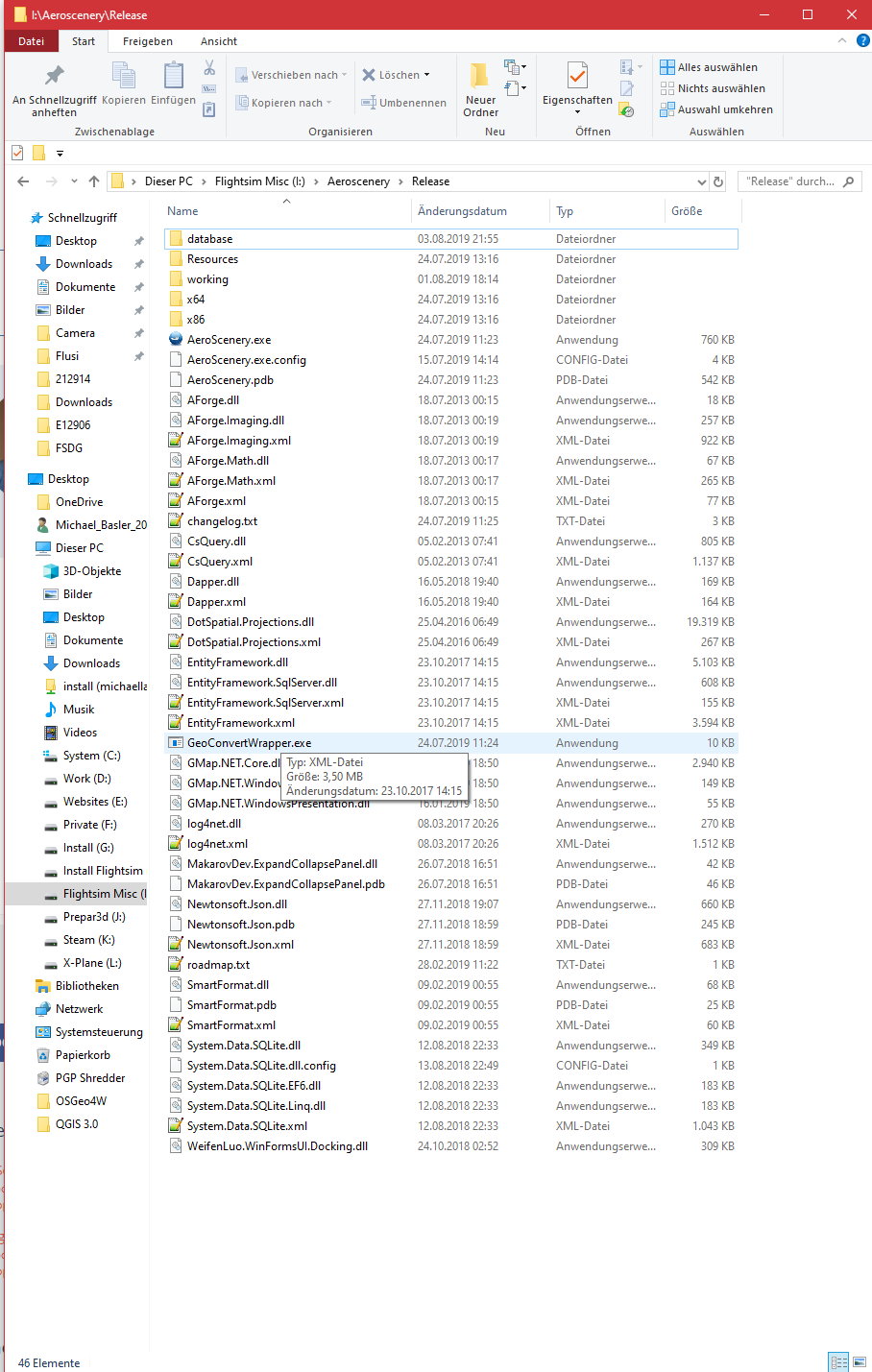
Click Aeroscenery.exe.
Kind regards, Michael
Hello Michael
I am defeated, (defeated). I had some interest in seeing how this Aeroscenery worked, but after all this series of difficulties, I think it is too cumbersome. This should not pose so many difficulties, even for an inexperienced person like me in this discipline, especially the installation.
Nevertheless, I write what I did:
1) This link, 'aeroscenery-1.1.0-beta.zip' downloads a folder with the name of 'Release'
2) I created a subfolder of Aerofly FS 2 with the name of AeroScenery, in which I copied the contents of Release (naturally, after decompressed.)
3) This folder (Release), according to you, contains 46 files, only 44 appear to me.
4) The program runs but I can't install it. It is possible that one of those 2 files that I am missing is precisely the installation file, and I do not see it in the file list.
5) I have copied directly to the AeroScenery folder, the contents of SDK tools. Should I create a folder (Aeroscenery subfolder) for SDK tools?
6) And the most incomprehensible !!, I still can't see "Start"; Exactly the same, as with the previous installation. It is curious: I do not know in what way, but previously, the program had been installed. And also amazing: the previous Aeroscenery folder, had its files a size = 3.2 MB only; this one has = 46.4 MB.
This is how you can see in the image that I attached, the folder tree that I have installed:
C: \ Users \ Delfin \ Documents \ Aerofly FS 2 \ Aeroscenery \ aerofly_fs_2_sdk_tool
Anyway, Michael, I said I felt defeated, because I am not willing to continue torturing you with questions about this program. I don't give up easily, except, it's supposed to punish other people. In any case, this program is too cumbersome and confusing to download and install.
I previously downloaded it from GitHub; resulting in 3.2 MB. Now it is downloaded and appears with another name (the folder) Release and with size = 46.4 MB. At the same time, from the moment it is ordered to run, it should automatically continue with the installation process, even if it previously requested authorization to be installed. This is done by many programs, and is always a much appreciated simplification.
In this regard, I was very surprised by IPACS with its FS 2 through Steam. At the end of the download, you do not have to run anything or install. Finished downloading and ready to play !. Is that a job well done!
I repeat, dear companion, I deeply thank you for the succession of sacrifices you have made for me. I regret that in this case, the effort has not produced its fruits. Maybe next time.
Kind regards: Delfin
Display More
Hello Michael
I am defeated, (defeated). I had some interest in seeing how this Aeroscenery worked, but after all this series of difficulties, I think it is too cumbersome. This should not pose so many difficulties, even for an inexperienced person like me in this discipline, especially the installation.
Nevertheless, I write what I did:
1) This link, 'aeroscenery-1.1.0-beta.zip' downloads a folder with the name of 'Release'
2) I created a subfolder of Aerofly FS 2 with the name of AeroScenery, in which I copied the contents of Release (naturally, after decompressed.)
3) This folder (Release), according to you, contains 46 files, only 44 appear to me.
4) The program runs but I can't install it. It is possible that one of those 2 files that I am missing is precisely the installation file, and I do not see it in the file list.
5) I have copied directly to the AeroScenery folder, the contents of SDK tools. Should I create a folder (Aeroscenery subfolder) for SDK tools?
6) And the most incomprehensible !!, I still can't see "Start"; Exactly the same, as with the previous installation. It is curious: I do not know in what way, but previously, the program had been installed. And also amazing: the previous Aeroscenery folder, had its files a size = 3.2 MB only; this one has = 46.4 MB.
This is how you can see in the image that I attached, the folder tree that I have installed:
C: \ Users \ Delfin \ Documents \ Aerofly FS 2 \ Aeroscenery \ aerofly_fs_2_sdk_tool
Anyway, Michael, I said I felt defeated, because I am not willing to continue torturing you with questions about this program. I don't give up easily, except, it's supposed to punish other people. In any case, this program is too cumbersome and confusing to download and install.
I previously downloaded it from GitHub; resulting in 3.2 MB. Now it is downloaded and appears with another name (the folder) Release and with size = 46.4 MB. At the same time, from the moment it is ordered to run, it should automatically continue with the installation process, even if it previously requested authorization to be installed. This is done by many programs, and is always a much appreciated simplification.
In this regard, I was very surprised by IPACS with its FS 2 through Steam. At the end of the download, you do not have to run anything or install. Finished downloading and ready to play !. Is that a job well done!
I repeat, dear companion, I deeply thank you for the succession of sacrifices you have made for me. I regret that in this case, the effort has not produced its fruits. Maybe next time.
Kind regards: Delfin
Delfin,
It's not working for you because you simply just didn't install it correctly. Aeroscenery is a completely separate application from Aerofly. You have the zip folder when you download this application, you only have to unzip it and move that entire folder (that was unzipped) onto your drive. Inside that folder you will find the application file, you just run it and that's it. Aeroscenery will then open. Then set up the settings according to the instructions and you should be good to go from there.
I think it is too cumbersome.
it's supposed to punish other people. In any case, this program is too cumbersome and confusing to download and install.
Unzip the beta and run the .exe, there is no install for the beta.
You should not copy it into your Aerofly folder.
You don't need to copy the SDK into your AeroScenery folder (just set the path in settings)
You can't see the Start button as your desktop resolution is too low coupled with your Windows font size being very large.
It will work on a 1366 x 768 monitor, but not with that font size.
The beta version should resize down to a minimum to 1366 x 768 resolution with the default Windows font size.
It looks like the large Windows font size you have set is affecting that.
At this point the choices would be to either reduce the Windows font size or use a higher resolution monitor.
Good afternoon, Nick
Welcome from your vacation; It is clear that vacations always feel good. Here is the proof: in view of my difficulties with the installation of Aeroscenery, how is it possible that we have not thought about modifying the resolution of the screen?, And ... especially me, the first one? !
Well, I listened to your advice: my resolution was 1600x900
I modified to 1366x768 and, worse
Again I modified to 1680x1050, and ... Eureka; Started "Start"!
Click on exe ..., Start ... and it works, but ...
But I can't find the file to install it.
I have downloaded the link you recommend on the first page of this thread (# 1), which turns out to be identical to the one I had already downloaded on Michael's advice (pmb). and attentively there is no installation file. What can I do now?
Well, dear friend, I am very grateful for this attention and desire to solve this difficulty with your AeroScenery program.
Sincerely, thank you, thank you, thank you very much
Kind regards : Delfin
But I can't find the file to install it.
The beta, linked on the first post of this thread, does not have an installer.
If it runs, you're done when you've set your SDK path in settings. Put the AeroScenery folder wherever you want.
Previous releases did have an installer.
Future production releases will have a zip bundle and an installer.
Hi Nick
Immediately that I discovered the 'Start' and the exe ... I ordered to process the tile that is seen in the post # 73 (N.W. Spain) of this thread. I wanted to have first contact with this program, although I assumed that this processing of this surface would not take advantage of it because I did not know the process to follow once it was finished. But I wanted, at least to know the processing times, both of Aeroscenery and Geoconvert.
These were the times:
Aeroscenery first phase = 2 hours
Aeroscenery second phase = 28 minutes
Geoconvert ------------ = 1 hour.
Here I started moving the small Geoconver window and I think I stopped the process. I was wondering where I would archive the files with the processed information. Then I saw it. Create new folders with their corresponding files. In this case, the folders are:
database,
working, in turn working creates the subfolders:
Map_09-7980_a200, which in turn creates the subfolder
g, with the subfolders:
17
17-Geoconvert.raw
17-Geoconvert.ttc
17-stitched
etc. etc etc.
Now I wonder, what to do with all this?
Is there a manual or tutorial that I can follow?
Clarify this: this is the first time that I approached beta programs. You say I shouldn't link Aeroscenery to Aerofly. In that case, where do I leave that folder? I beg you ... how did you do it?
Kind regards: Delfin
The folder "17-Geoconvert.ttc" should contain numerous files like "map_12_e400_a230.ttc". Copy these to
C:\Users\(your profile)\Documents\Aerofly FS 2\scenery\images\ES
(or whichever country you are working on.) Make sure you have an airport (e.g. FSCloudport) in the area and go flying.
Don't worry about the beta status. The present AeroScenery works better than some payware release programs.
Kind regards, Michael
Hi michael
After copying (as you suggested) the folder 17-Geoconvert-ttc to C:\...scenery\ images\ES; I loaded FS 2 and when I select the area to fly (geoconverted area), the order is not obeyed. I have everything locked. Even ,, to leave FS 2, I have to do it "Ctrl + Alt + supr".
Anyone else have this? It is a failure of aerofly, Steam, etc. or only mine? Regards: Delfin