

I will re upload "Building Textures" onto flight-sim.org for you Michael as they are too big to share here.
Cheers, Michael.

I will re upload "Building Textures" onto flight-sim.org for you Michael as they are too big to share here.
Cheers, Michael.
Thanks. The issue is not so much with me, I have a previous version (although there are several ones floating around, not sure mine is the correct one), but I am sure it will be of help for anyone following your nice couple of tutorials.
Kind regards, Michael (II)
"Cultivation Help Files" just uploaded onto flight-sim.org
Thanks, just downloaded, I didn't have these yet.
Best regards, Michael (II)

This is great. However, I thought someone told me that the default Aerofly uses USGS imagery. I tried a test area in Yosemite, and it does not match at all. Maybe the images have been updated since the devs added their textures to the sim? The newly-converted USGS image is on the bottom/right, and default is on the top and left.
It's likely that IPACS edited USGS scenery to correct colours and boost contrast and saturation.
You can do this with AeroScenery too, but it'll take some trial and error.

Yes, sorry I have to confirm the black squares too.
It seems necessary Nick, that you check if the requested tiles are downloaded. In negative case request the tile again...
Yep, The next beta release will check that the USGS tile is a valid image and try again if not.

"Fixed Grid Square Hex Names
Previous version got the hex names of grid squares wrong".
Can this, or something similar, be the reason for our problem of the misplaced "Grid Square"?
It shouldn't be. That issue was just the AeroScenery UI getting grid square names wrong. The coordinates of the scenery were still correct.
I'll do more testing with ArcGIS when I'm back from holiday.
I am doing a several-tiles set right now. If the Geocovert window is open it runs through the selected levels and stops with the green ESC message but doesn't close by itself. I have to close it manually, then the next Geoconvert instance starts. Is this okay? I thought the Geoconvert window would be closed and the next instance starts automatically.
I didn't move the Geocovert window but minimized it inbetween. The wrapper is selected and works.
Kind regards, Michael
You have to select that feature in the GeoConvert pnel.
Picture attached...................

You have to select that feature in the GeoConvert pnel.
Picture attached...................
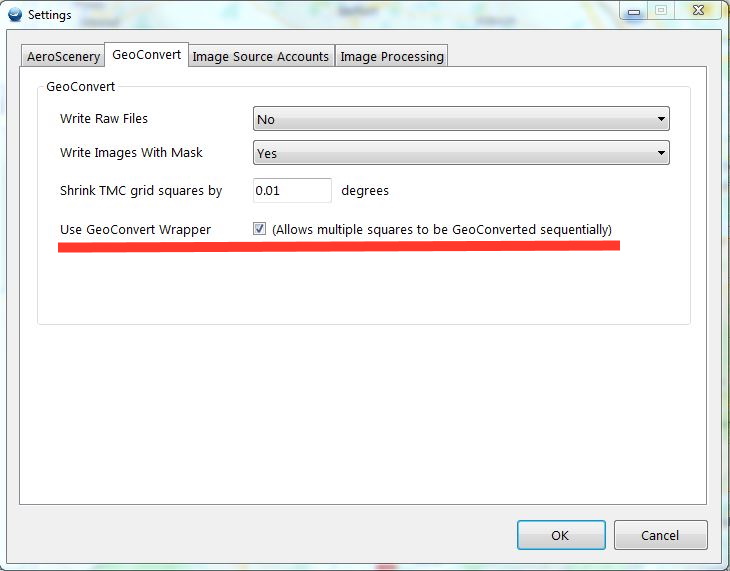
Thanks. This was my first thought, was well, but I confirmed the box is checked. In addition, I see the Wrapper to start which calls Geoconvert afterwards. (Strangely, a new Wrapper instance seems to come up after I close a Geoconvert window after it completed.)
Kind regards, Michael (II)
As a follow-up, I just made a few tiles using Google where this issue does not happen. Thus, either its something with ArcGis tiles which I used above (improbable, but who knows) or it was just a temporary glitch.
I'll keep an eye on this.
Kind regards, Michael
I also have been experimenting with "ArcGIS" and remaking Tenerife and La Gomera Islands and processed 2 and 3 tiles at time with the "GeoConvert" sequentially without problems.
This is of no help to you Michael but I thought I would mention my findings anyway.
Cheers, Michael.
I can process up to six tiles at once. Seven bogs the system down. The only downside is the requirement of being at the pc to get past this AutoScenery STOP notice to proceed with starting the GeoConverter.
This does not require the checkmark in the sequential runs. That send a constant waiting message that is never needed.
I would like to see that constraint removed. A notice is OK, but after a minute or so, it should turn the computer loose to go to work.

I can process up to six tiles at once.
Ray, do you see any advantage against converting only a single task?
In the single mode I get 90% load of all 8 cores and I can still work.
Tom, not just when running one instance. Running 3 instances seems to be ideal, although the system will run 6 by spreading the load between the cpu and gpu.
Tom, not just when running one instance. Running 3 instances seems to be ideal, although the system will run 6 by spreading the load between the cpu and gpu.
This means you're running without GeoConvert Wrapper, right? I tried this once (ages ago) and my system virtually came to a halt. Probably because I selected too many tiles.
Kind regards, Michael
Correct. When I add the checkmark for the wrapper I get a constant text message that it is waiting on a file but it doesn't seem to contribute anything. I leave it unchecked and just select up to six any sized blocks and let it go. The message pops up about using the wrapper and STOPS work until I acknowledge it. I have asked several times that Nick either remove the message and turn the system loose after some time delay.
I also have been experimenting with "ArcGIS" and remaking Tenerife and La Gomera Islands and processed 2 and 3 tiles at time with the "GeoConvert" sequentially without problems.
Good afternoon, Michael (IZOJUB)
I have read that you have remade the Islands of Tenerife and La Gomera. As a result has improved its resolution ?. If so, I would be willing to download them again from the list. Do you recommend that I download them again?
Which of the titles should I download:
1st) Tenerife Island, or
2nd) Tenerife cultivation.
Thanks for that, regards: Delfin
I decided to try this tool so I set a small area at first to try and it worked properly, but then I decided to go for a larger area with a higher resolution so I set it up as such;
grid square size=11
AFS levels= 12,13,14,15
image detail 18
Everything appeared to be running well so I left it go overnight. When I returned to it there were 16 geoconvert windows open and not responding.
Is there a bug that i'm not aware of here? Or an I missing something here.
Is there a bug that i'm not aware of here? Or an I missing something here.
AeroScenery can call GeoConvert in two ways: the default, which opens up the same number of GeoConvert windows as the number of tiles you have selected, or with the wrapper where I (attempt to) open and close GeoConvert windows sequentially.
You can change that preference in Settings > GeoConvert
If you didn't have it selected, you must have inadvertently selected several tiles. It's easy to do as they are selected with one click. The status bar at the bottom will show how many you have selected.
Opening several GeoConvert processes will usually cause all of them to lock up, so I warn against this in AeroScenery.
If you had it selected, the process I use to figure out if GeoConvert is done and kill the task hasn't worked. This is entirely possible, as I'm having to screenshot the GeoConvert window every second and scan for green text. GeoConvert (particularly the newest version I find) often fails to report it's done when it's done and just hangs, making this process fail.
The fragility in the process would be avoided if GeoConvert was a normal console app that exited when it was done.
I have asked several times that Nick either remove the message and turn the system loose after some time delay.
Single GeoConvert instances utilise all cores. Multiple instances fight for disk IO. On my machine at least, running them parallel was slower and less reliable than sequentially.
That said, in the next beta release I will add an option to never show that message again after the user has seen it once.

I am doing a several-tiles set right now. If the Geocovert window is open it runs through the selected levels and stops with the green ESC message but doesn't close by itself. I have to close it manually, then the next Geoconvert instance starts. Is this okay? I thought the Geoconvert window would be closed and the next instance starts automatically.
It should be closed automatically if you're using the wrapper. I'll do some more testing with GeoConvert and the new tile sources, but it shouldn't make a difference.
Ultimately I'm taking screenshots and trying to force the GeoConvert window to the front, which is error prone to say the least.
Until IPACS put some more time into GeoConvert, these issues with persist unfortunately.